


Wire Image

Terminal7

The terminal that
gets out of your way.

Manage complex local stacks without the mental overhead. Terminal7 is a visual multiplexer that replaces tmux chords with intuitive controls, keeping your workflow organized, persistent, and secure across every device.

Tmux power. Zero configuration.

Stop wrestling with complex dotfiles and obscure keybindings just to split your screen. Terminal7 lets you slice your pane, drag borders and more. Drop into a perfectly tuned multi-pane environment with zero setup.

Code from anywhere. Reconnect instantly.

Leave your heavy local stack running on your desktop and pick it right back up on your tablet or laptop. Powered by secure WebRTC, Terminal7 maintains persistent, UDP based sessions across networks—no VPNs or dropped SSH connections required.
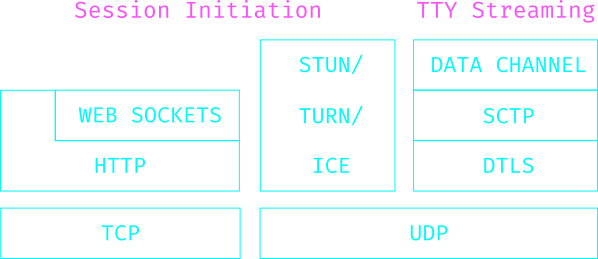
A layer cake of the protocols Terminal7 uses
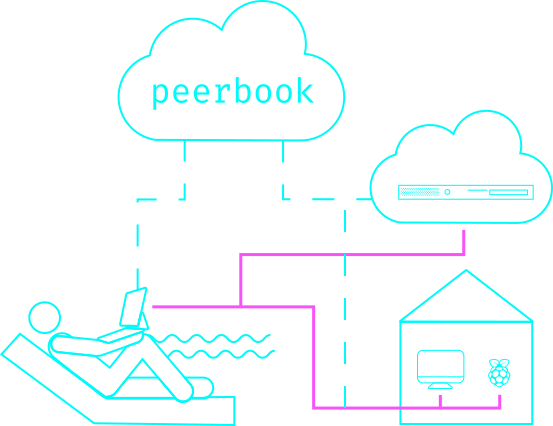
A network diagram showing a Terminl7 user connecting to different hosts

Connect your way. We'll meet you there.

Already running a VPN or have static-IP servers? Terminal7 connects directly — no extra service required. For everything else — laptops on coffee-shop Wi-Fi, home desktops behind a NAT, machines with addresses that change — there's PeerBook: a managed signalling and relay service with a 2FA-protected address book, so you reach your fleet by name instead of by IP.

Mark & yank with surgical precision.

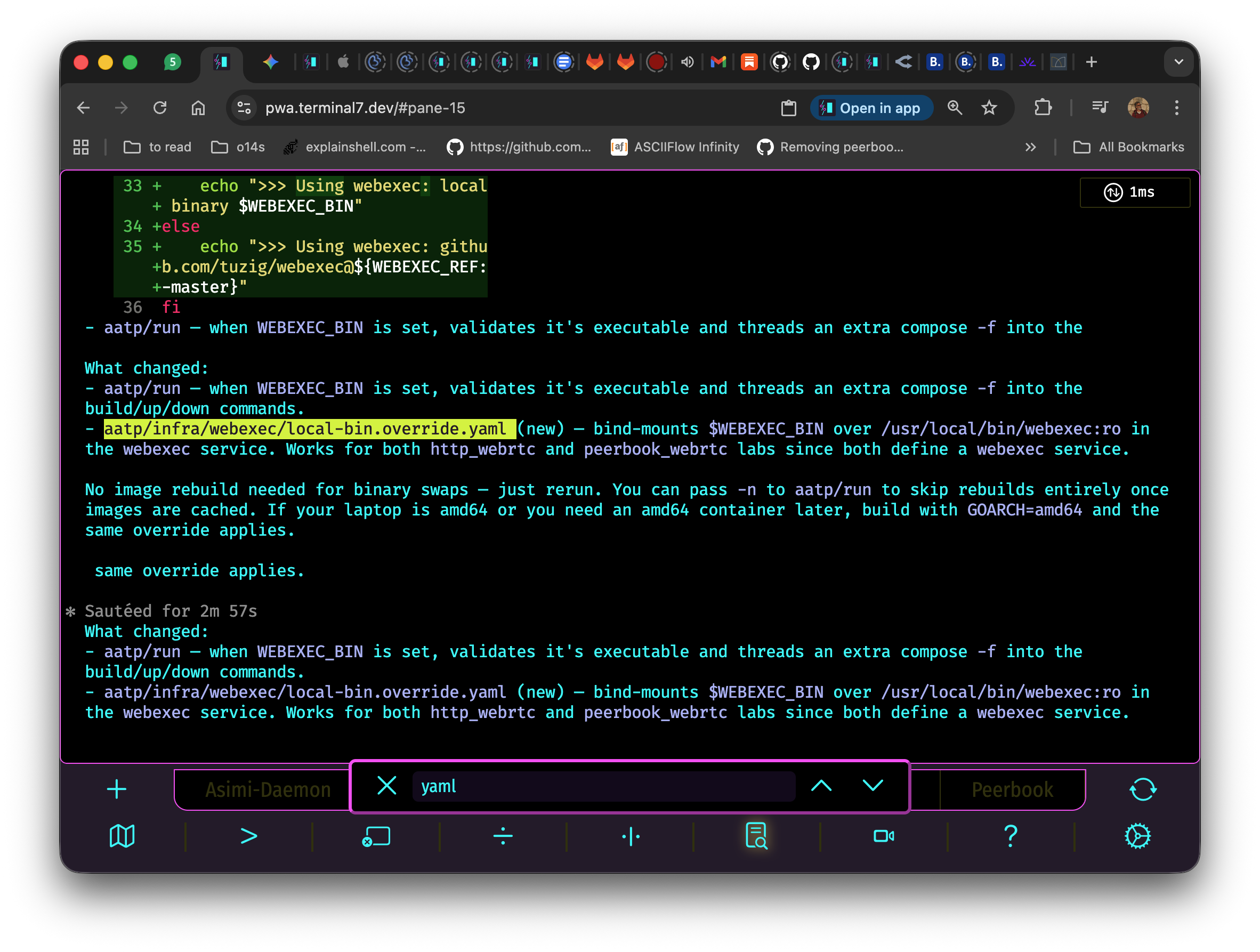
Selecting text by touch or trackpad is sloppy — words land mid-sentence, line endings get lost. Copy Mode drops the active pane into a vim-style visual selection: move with hjkl, toggle a mark with space, hit enter to yank straight into the clipboard. Search the scrollback with / and ? without lifting your hands off the keyboard.
Terminal7 pane in copy mode: a yellow-highlighted selection on a filename, with the scrollback search bar showing a 'yaml' query

Captain's Log

  • Why Seven? January 18, 2026

    Why seven? Becuase it’s the first seventh genreation terminal.

    Terminals have been with us since the first digital computer, Z3, came out in 1941. Z3’s terminal was just a numeric keypad. It took 14 years till the Whirlwind Mark I computer that had a keyboard-typewriter.

    It took nine more years for the first display screens to be released in 1964. This early the next geenration to come along and very few lucky developers got to work with screen. This generation of Terminals worked in block mode, where the entire screen is transmitted.

  • Simplifying things with a Vanilla Server August 22, 2024

    Docker is great. It’s not only a lightweight VM but also a library of OS images. It makes it easy to run a server on a machine without having to install anything on the host.

    This is especially true for python and node projects which depend on a lot of external libraries. Docker helps package it all in a portable image with all dependencies includes. A docker image can run on any machine and used by k8s and other orchestration tools.

  • Making WebRTC eat its tail July 24, 2024

    [Edit: 2024-08-07 Addinng the second visit to the wizrds and some code]

    Learning New Magic

    WebRTC is a weird protocol. On one hand, it has the power to connect to every device on the network and stream video, audio and data. On the other, it’s incomplete. It depends on “magic” - an unspecified signaling server that teleports connection candidates between the peers until a connection is made.

    This magic was new to me so I sought advice. My quest led me to a sect of wizards that were practicing this kind of sorcery. They call themselves pions and they share a Golang WebRTC library to use in their quests. The pions can be found on #pion channel on the gophers’ slack. I messaged them with a simple query: How to conjure the signaling magic?

  • testcontainers vs. docker compose May 9, 2024

    As Terminal7 includes three main components, changes can get complicated. When a change encompasses more than one program, we tread carefully, using tests to separate concerns and break down the work.

    We start at the lowest level, usually writing webexec tests. For example, when adding clipboard support, I first wrote grey box tests to ensure webexec adheres to the new clipboard protocol.

    Grey box tests are tests that access the internal state of the program to validate its behavior. They are not as complete as black box tests but they are faster as they require less setup. In webexec case, we use Go built-in testing and a WebRTC test client to ensure webexec is adhering to its contract.

  • Version 1.10.0: Clipboard integration and more April 16, 2024

    Greetings Snowflakes!

    I hope this version finds you well. It’s a big one, with one big feature and a few improvements. I want to thank Yael Hazan and Alon Milveski for their contributions to this release.

    Yael added a color indication to the latency: yellow when it’s above 100ms and red when it’s above 400ms. Alon trimmed the in-gate stats, leaving only latency and moved the display inside the terminal window. They both found a couple of bugs and together we squashed them.

  • Version 1.9.2: Bug squashing and the support command March 19, 2024

    Greetings Earthlings!

    I hope this version finds you well. This patch version was includes:

    • Fixing a reconnect bug
    • Extending default history buffer to 10K lines
    • Rendering engine upgrade
    • Halting retry attempts when network is down

    We’ve also added the new support command that send your report together with Terminal7’s log to our support system. Please use it when you find bugs or things look funny.

    Happy hacking!

  • Version 1.9: pure WebRTC communications December 5, 2023

    Greetings Users & The Curious

    I hope this version finds you well. This version has been unlike any before - just as I was starting to work on it war broke out.

    Stories from the massacre hit me hard and I barely got anything done in the first couple of weeks. Almost every day we’ll have sirens go off rushing us the bomb shelter just below my building’s lobby. I remember one siren that went off just as I was cornering one snicky bug. I felt the complex flow I held in my mind dissolved in a second as my daughter was urging me to leave the keyboard and run to the shelter. Still, I’m thankful for that and other snicky bugs as they kept my mind away from the horrors.

  • Version 1.8: Web version and synced clients September 14, 2023

    This is a big version, on of the biggest we’ve ever released. Version 1.7 added Android support and 1.8 adds a Web version.

    It is packaged as a Progressive Web App and can be installed from chrome’s toolbar. Naturally, it doesn’t support SSH, only WebRTC. I use it on my desktop to work on the localhost making the transition to/from the iPad seamless. When at home I use Terminal7 on the large screen and mechanical keyboard. When I roam, I connect to my desktop and it’s just like I’m back at my seat.

  • Terminal7 Version 1.6 - SSH is now free! August 19, 2023

    Greetings Terminal7 users,

    I am excited to introduce you to Version 1.6 of Terminal7, the terminal designed for the tablet age. With this latest release, we make the SSH version free as its been since the PuTTY days.

    One of the major updates in Version 1.6 is the division of Terminal7 into two distinct versions: a free version and an online service. The free version, which is now available in the App Store, supports only SSH connections. You can connect to any SSH server and take advantage of a range of features: a local multiplexer, camera pane, touch gestures, true colors, nerd fonts and more. Additionally, we have added biometric authentication for added convenience and security.

  • Trickling ICE over SSH January 16, 2023

    WebRTC is a weird protocol. It’s a monster made from over 30 RFCs that can carry real time video, audio and data. Still, it can’t establish a connection on its own. It counts on the app to provide a signaling service that passes ICE candidates between the peers.

    In a WebRTC apps, ICE is used to discover the best path for sending data between the two parties. This process involves gathering a list of candidate IP addresses and ports, and then trying each one in turn until a successful connection is made. The actual process of gathering candidates and establishing a connection is handled by the WebRTC library, leaving the application developer to focus on the connection.